


SOLVED: VPN DNS Timeouts After Migrating from Meraki to UniFi
- Home
- /
- Support Articles
- /
- SOLVED: VPN DNS Timeouts After Migrating...
How to Fix Domain Join and DNS Issues Over a Site-to-Site VPN
If you recently migrated from Cisco Meraki to Ubiquiti UniFi and your VPN shows “connected” but DNS and domain services fail, you’re not alone. This is a common issue when replacing Meraki AutoVPN with standard UniFi IPsec tunnels.
In this guide, we’ll explain:
- Why DNS fails over VPN even when the tunnel is up
- Why TCP works but UDP times out
- The exact fix that resolves the issue
- What doesn’t fix it (so you don’t waste time)
Common Symptoms
After migrating from Meraki to UniFi, you may notice:
- VPN tunnel shows Connected
- Users cannot join the Windows domain
- Active Directory logins fail
- DNS lookups time out across sites
- Internal servers are reachable by IP, but not by name
Typical Test Results
✅ TCP traffic works (LDAP, RDP, etc.)
❌ UDP traffic fails, especially DNS (port 53)
This often appears as:
“DNS request timed out”
even though the DNS server is reachable.
Affected Environments
This issue commonly occurs in environments with:
- Windows Server 2016+ Domain Controllers
- Active Directory with internal DNS
- UniFi Gateways replacing Cisco Meraki
- Site-to-Site VPNs between offices
- Standard IPsec tunnels (not SD-WAN)
Why This Happens (Root Cause Explained Simply)
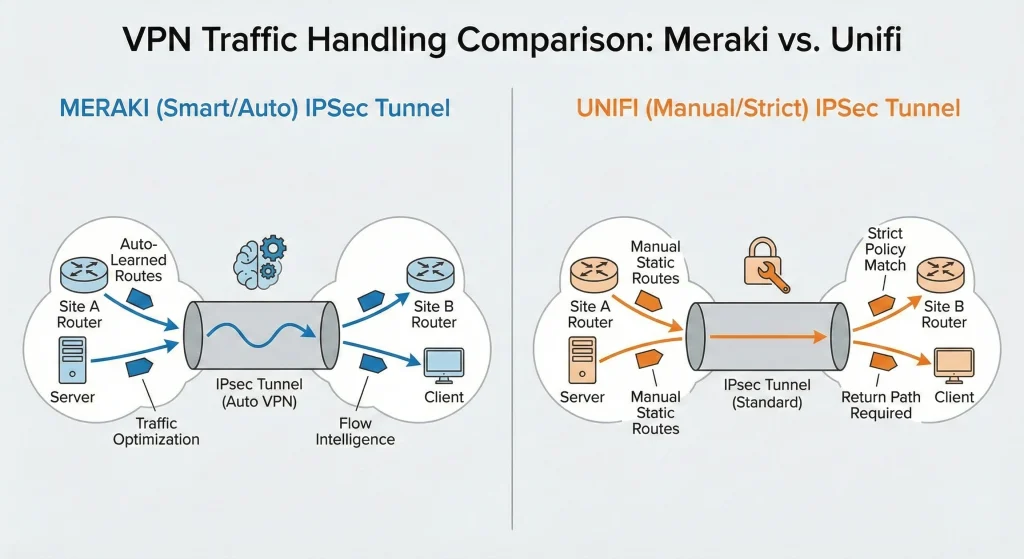
Meraki vs UniFi VPN Behavior
Cisco Meraki AutoVPN
- Automatically handles routing
- Learns remote subnets
- Manages return traffic intelligently
- Works seamlessly with DNS and Active Directory
UniFi Standard IPsec
- Requires manual static routes
- Does not automatically handle return paths
- Can drop or misroute UDP response traffic
- Especially problematic for DNS
The Key Problem
DNS primarily uses UDP, and while UniFi receives the request, it often doesn’t know how to send the response back to the originating subnet. The result?
➡️ DNS requests leave
➡️ DNS responses never return
This creates the classic:
“TCP works, UDP fails” scenario
The Correct Fix (What Actually Works)
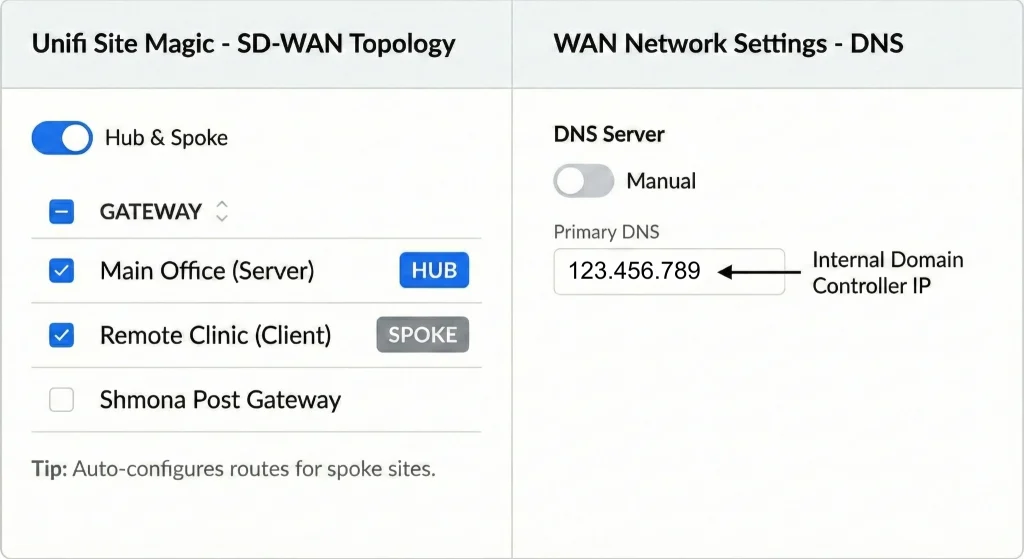
✅ Use UniFi SD-WAN (Site Magic) Instead of Standard IPsec
The permanent fix is to replace standard IPsec with UniFi SD-WAN (Site Magic), which restores the automatic routing logic Meraki provided.
Why This Works
UniFi SD-WAN:
- Automatically learns routes
- Handles return traffic correctly
- Properly supports DNS and Active Directory
- Eliminates manual static routing issues

Step-by-Step Solution
1. Remove the Existing IPsec Tunnel
- Delete the manually configured Site-to-Site IPsec VPN
2. Enable UniFi SD-WAN (Site Magic)
- Create a Hub-and-Spoke topology
- Set your main office / server site as the Hub
- Connect remote locations as Spokes
3. Verify DNS Settings
In UniFi Network settings:
- Set WAN / Network DNS
- Ensure the internal Domain Controller IP is listed first
4. Test and Confirm
Run this from a remote client:
nltest /dsgetdc:yourdomain.com
✅ If successful, the Domain Controller is discovered and DNS is working properly across the VPN.
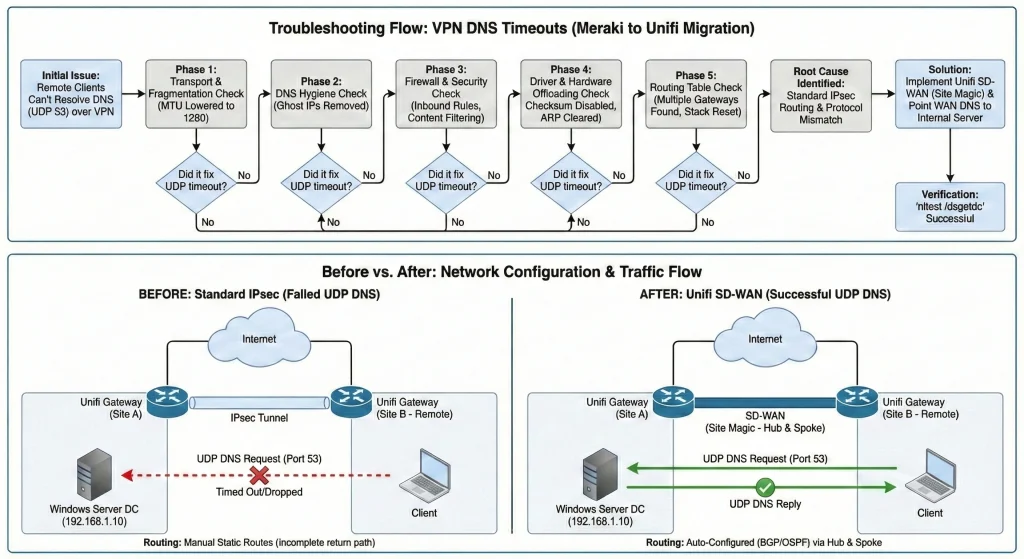
What We Tested (And Why It Didn’t Fix the Issue)
These steps are useful diagnostics, but they do not solve the core routing problem on their own.
MTU & Fragmentation
- Lowered MTU and MSS clamping
- No improvement
DNS Record Cleanup
- Removed old “ghost” A-records
- Improved accuracy, but DNS still timed out
Firewall & Security Rules
- Verified Windows Firewall scopes
- Allowed UDP 53 from VPN subnets
- No change
Network Adapter Offloading
- Disabled UDP checksum offload
- Disabled large send offload
- No change
Server Routing Cleanup
- Removed multiple default gateways
- Reset TCP/IP stack
- Improved routing clarity, but DNS still failed
➡️ The issue was never the server — it was the VPN return path.
Key Takeaway
When migrating from Meraki AutoVPN to UniFi, standard IPsec tunnels are not a drop-in replacement.
If you experience:
- VPN connected but DNS failing
- Active Directory issues across sites
- TCP works but UDP fails
👉 Skip extended IPsec troubleshooting
👉 Deploy UniFi SD-WAN (Site Magic)
👉 Verify with nltest
This approach saves hours (or days) of troubleshooting and restores reliable DNS and domain functionality immediately.
Need Help Fixing This?
ADVYON helps businesses and IT teams:
- Migrate from Meraki to UniFi
- Design reliable VPN and SD-WAN networks
- Resolve DNS, Active Directory, and routing issues
- Optimize network performance and security
